

What is an MCP Server?
The Model Context Protocol (MCP) is an emerging open standard designed to improve how AI agents and applications interact with external tools and contextual data sources. Its primary goal is to enhance prompt generation and provide LLMs with more relevant, structured context.
An MCP Server can expose different types of functionality - ranging from simply delivering data to performing more complex actions. You can find available MCP Servers in the Official MCP Registry.
Connecting Data and Examine It in a chat
MCP Servers designed for data connectivity typically fall into two categories, the ones which can provide (read) data and those who support full CRUD operations. Read-only MCP Servers guarantee that data cannot be changed, manipulated, or deleted. This is why the ODS AIConnect MCP Server is read-only.
Once you’ve registered an MCP Server with your AI agent (e.g., Claude Desktop or Microsoft Copilot for VS Code), you can begin by asking questions about your data in natural language.
⚠️ Although AI agents understand multiple languages, best results are typically achieved using English.
Creating Your Own Analysis Tools
In programming environments such as Microsoft VS Code, an MCP Server can be orchestrated together with capabilities provided by Copilot – such as automated code generation.
This makes it possible to:
- Develop custom analysis tools tailored to your specific data and use case.
- Iterate quickly using conversational prompts and AI-generated code.
Using ODS AI Connect
ODS AIConnect is an MCP Server specially designed to work with ASAM ODS servers in combination with Peak ASAM ODSBox.
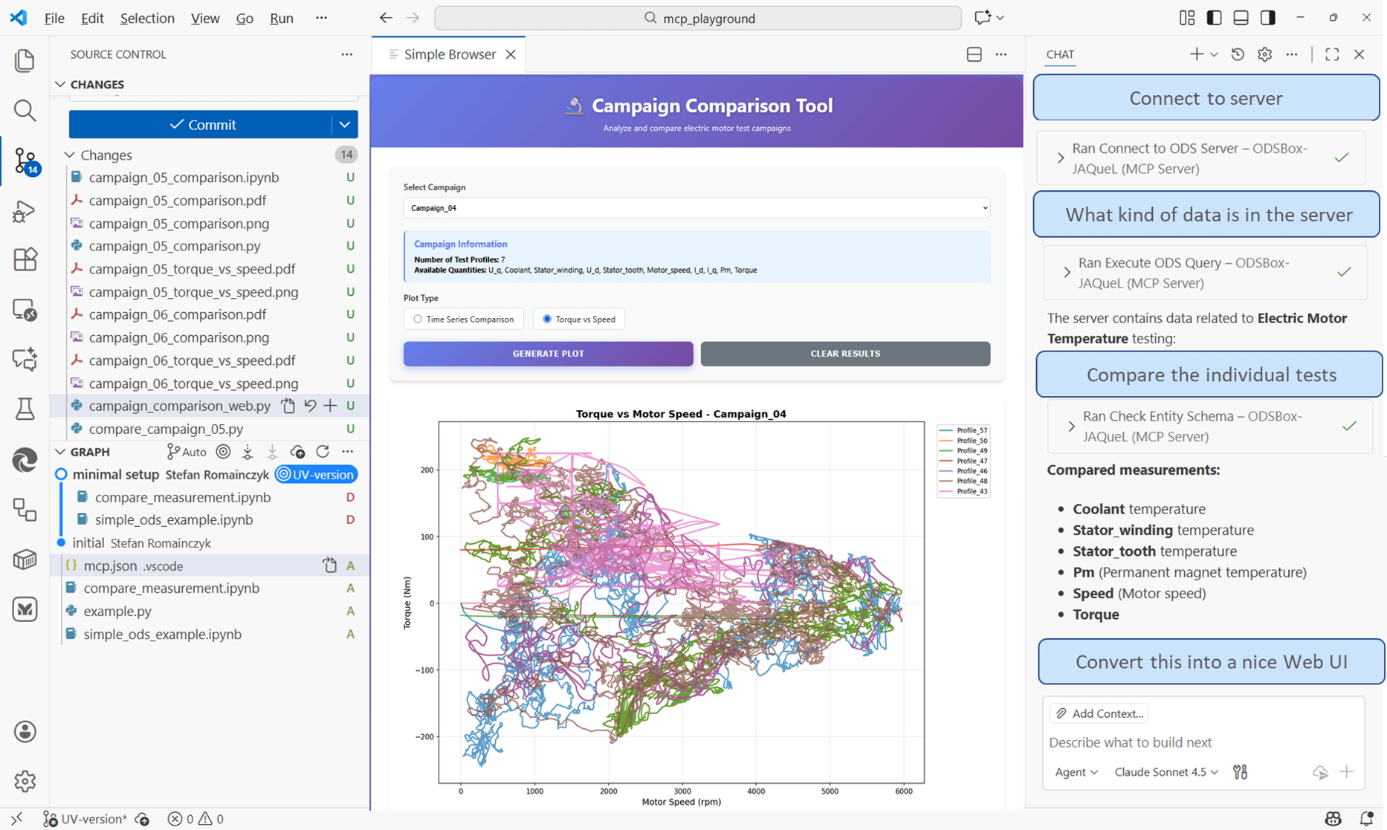
Below is an example conversation flow:
1) Establish a Session
Prompt: “Connect to my ASAM ODS server”
The agent requests the necessary login information, connects to the ODS server, and retrieves the data model (ontology) for Copilot.
2) Ask Questions About the Data
Prompt: “What kind of data is in the server?”
The agent returns an overview of the data. Copilot coordinates multiple MCP interactions to collect the required information.
3) Start Analyzing the Data
Prompt: “Compare tests of a certain campaign”
Copilot generates and executes Python code against the data using ASAM ODSBox supported by the MCP Server. If errors occur, you can ask Copilot to fix them or refine the analysis.
4) Create an Application
Prompt: “Transform this into a web app”
Once the analysis works as desired, you can ask Copilot to generate a web application.
In the example, the app was extended to allow switching between campaigns, updating the corresponding visualizations.
Connected solutions
You can click on the links to get more information about the individual components
Peak Test Data Manager
Peak ODS Server is the data heart of Peak Test Data Manager - a future-oriented test data management system.
Peak ODS Server
ASAM ODS data management kernel. Ensuring data quality and data context through predefined data models
PeakTDM FileFocus
Derive your data-driven decisions quickly from the content of your measurement files
Peak ASAM ODSBox
Lightweight Python Toolkit for Seamless ASAM ODS Data Access and Analysis
Related topics
Python ODS Utilities
Open source libraries and examples for using ASAM ODS data in Python.
